Two apps on the App Store. The code was the small part.
This fall I shipped two apps to the App Store. Tailogue went live on October 30. Estalogue followed on November 1.
Both are AI apps built the same way: you talk to them like you’d talk to a person, and they keep a record. Coding agents wrote most of the code for both. And on both, the code was the part I worried about least.
This post covers what the apps are, what shipping them actually involved, the lessons I want to keep, and every pitfall we fell into along the way. It’s also written for my next coding agent, which will read it before we ship the next app.
The two apps
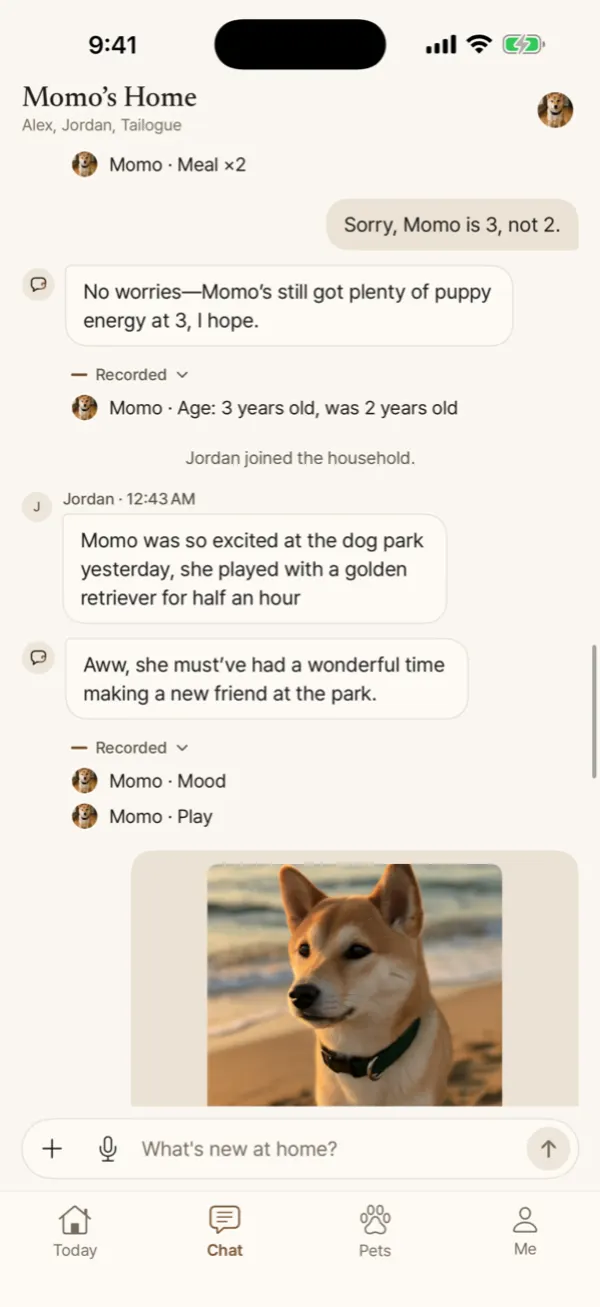
Tailogue is a health record for your pet that you fill in by talking. Say “took Momo to the vet, he’s 9.4 kilos now, she’s putting him on Apoquel, and he threw up twice this morning” and it files a vet visit, a weight, a medication and two vomiting events, each linked back to what you said. Ask “how many times did he throw up this month?” and the database does the counting. The assistant never guesses a number and never diagnoses. Your family shares one household, so everyone’s notes land in the same record. It’s free on iPhone, and Android is on the way.
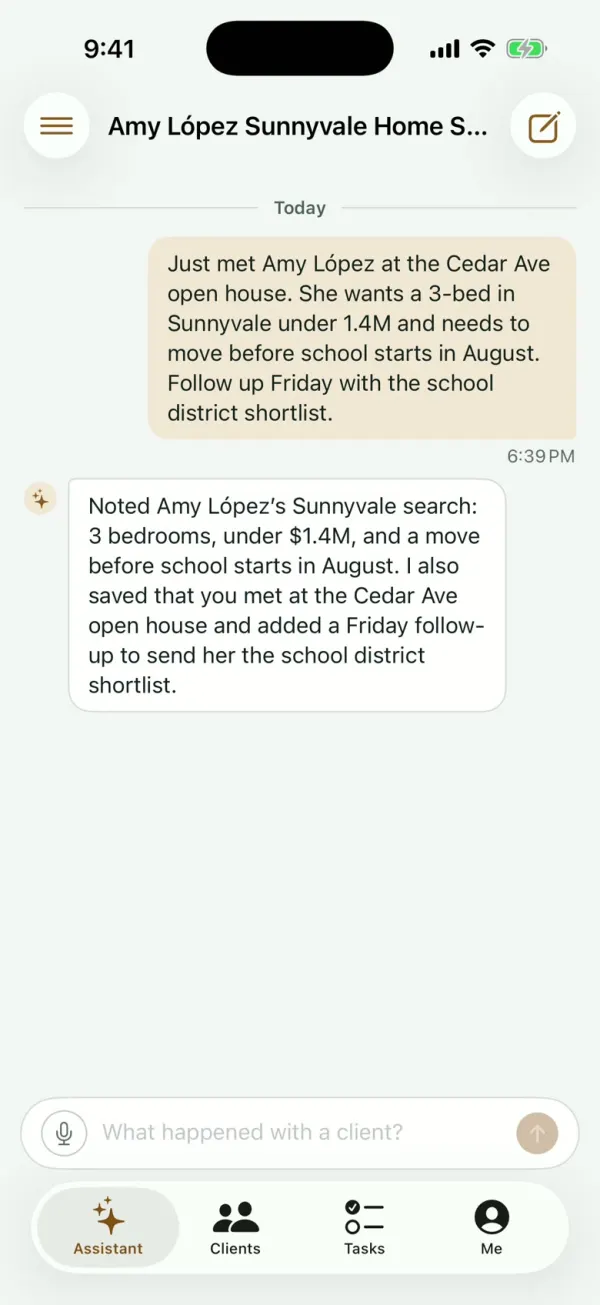
Estalogue is the same idea for residential real estate agents. Tell it what a client said after an open house (budget, area, timing, the kids’ school) and it files it under the right client. It turns “I’ll send her the school list Friday” into a task with a reminder, and it answers when you ask “who’s looking under $1.4M in Sunnyvale?” It’s free on iPhone.
If you have a pet or sell houses, give them a try and tell me what breaks.
The code was the small part
Here’s roughly how big the coding was. Tailogue is 494 commits across 146 pull requests: a FastAPI backend, a SwiftUI iPhone app, a Kotlin Android app that mirrors the iPhone app file for file, and a website. Estalogue is 385 commits across 45 pull requests. Coding agents wrote most of it. I designed it, reviewed it, and tested it on my phone.
Now here is everything else I had to set up. None of it is code:
| Layer | What I used |
|---|---|
| Domain and DNS | Namecheap (registrar), Cloudflare (DNS) |
| Zoho Mail on each domain, AWS SES for in-app feedback | |
| Website | Astro, hosted on Cloudflare Workers |
| Sign-in | Clerk, Sign in with Apple, a Google Cloud OAuth client |
| Backend | AWS Lightsail containers, RDS Postgres, S3, CloudFront, SSM Parameter Store, IAM, Budgets |
| Push notifications | An Apple APNs key, Firebase Cloud Messaging |
| CI/CD | GitHub Actions, with an OIDC role into AWS |
| Stores | Apple Developer Program, App Store Connect, TestFlight, Google Play Console |
| AI | OpenAI’s API, with DeepSeek as a switchable alternative |
That’s about twenty services, most with their own account, billing page, settings dashboard and a few traps. None of them is hard on its own. Together they’re the real work of shipping, and almost none of it is in the tutorials, which stop at “deploy”.
The calendar belongs to other people
Tailogue’s first commit, a system design doc, landed on September 9. The first TestFlight build went up on September 30. I submitted to App Review on October 6.
Then it sat in “Waiting for Review” for 24 days. Apple’s queue was backed up that month, and there was nothing to do but wait (and, eventually, send a polite status inquiry). When the review finally started, it took 17 minutes. Tailogue was live on October 30.
Estalogue’s last build went up on October 30, and it was on the App Store on November 1.
Same developer, same kind of app, three weeks apart. The difference was the queue, not the app. Google Play is slower by design: a new personal developer account has to run a closed test with at least 12 testers, opted in for 14 days in a row, before it can even apply for production. Tailogue’s Android app is in exactly that step as I write this.
Lesson: start the slow clocks before you write code. Developer accounts, the Play closed test, checking that the name is free: anything where someone else’s queue sets the date goes first.
Some doors only open one way
You can change most decisions in an app next week. A few you can’t, and they look exactly like the ones you can:
- The bundle ID.
com.tailogue.appis permanent once a build is submitted, both on Apple and as Android’s application ID. App extensions are named with it as a prefix (com.tailogue.app.widget), so pick a short one. - iPad support. Once a version ships for iPad, later versions can’t drop it. I shipped 1.0 for iPhone only. iPad owners get the phone app in a window, and a real iPad version can come later, on purpose.
- Lightsail’s managed database. It costs the same as RDS, but its snapshots can’t be restored into RDS, so leaving later means a dump and downtime. Same money for a one-way door, so I used RDS.
- Clerk’s development instance. It’s capped at 100 users, and its accounts can’t move to production. Switch to the production instance before any real tester signs up, not after.
Lesson: before each setup step, ask “can I undo this?” If the answer is no, slow down for that one step. Go fast on everything else.
The reviewer is a user who can’t read your email
Both apps let you sign in with a code sent by email, with no password. That’s nice for users, but an App Reviewer can’t sign in that way, because they don’t have your inbox.
TestFlight’s beta review rejected Tailogue’s build 3 for exactly this (guideline 2.1: no demo account; Sign in with Apple wasn’t enough). The fix was Clerk’s test mode on the production instance. Email addresses with a special suffix sign in with a fixed code, and no email is sent. App Review gets one of those accounts, set up with a dog and a few records so the app isn’t empty. The code goes in App Store Connect’s password field, with a note saying there is no password.
Apple’s other requirements surprised me the same way. None of them takes much code, and every one of them blocks you:
- account deletion inside the app, and, if you offer Sign in with Apple, revoking the Apple grant when the account is deleted;
- a privacy policy URL, and a privacy label that names every company that receives user data, including the AI provider;
- a support URL, an age rating, and listing text that doesn’t say “beta” or “free for now”.
The second app should have been copy-paste. It wasn’t.
This is the lesson that made me write all this down.
By the time Estalogue was ready for testers, Tailogue had already solved nearly every shipping problem: same backend shape, same sign-in vendor, same AWS account, same deploy scripts. Estalogue should have taken a week.
Instead, its second TestFlight build went out with grey bands floating mid-screen, stock iOS sheets that didn’t match the rest of the app, a debug row on the settings screen, and Chinese text leaking into the English interface. A review pass afterwards found 205 issues, 33 of them serious. Tailogue had already fixed most of those exact problems. The fixes lived in Tailogue’s repo, and nothing told the agent working on Estalogue to look there.
Then sign-up broke for brand-new users. The app code was the same as Tailogue’s. The difference was in Clerk’s dashboard: Estalogue’s production instance had “sign up with password” turned on, which is Clerk’s default, while Tailogue’s had it off. New users entered their email code, and then Clerk waited for a password the app never asks for. Nobody caught it because every test account already existed.
The lessons:
- When something works in app A and not in app B, compare the dashboards before the code. Vendor settings are configuration you can’t grep.
- Before every tester round, sign up on production with an email address that has never been used. Existing accounts hide sign-up bugs.
- Lessons that stay inside one project don’t transfer. They have to live somewhere the next project will read. That’s what this post is for.
Nobody looked at the screens
Tests passed. Code review passed. The app still looked unfinished, because nobody had looked at every screen.
Here’s Tailogue’s version of it. Before launch I found a footer on the settings screen that said “Tailogue: A shared care record for your pet.” I never wrote that sentence. It was filler text from the design mockups, and the coding agent had copied it word for word, along with a placeholder avatar and a few other bits. An audit of the whole app turned up 131 things like that.
Now no build goes to testers until every screen has been captured on the simulator (empty, full, offline, dark mode, every language, the largest text size) and someone has actually looked at the screenshots.
Lesson: text in a mockup is a placeholder, never the real copy. And “the tests pass” doesn’t mean “it looks right”.
Every other pitfall we fell into
The lessons above came from the biggest mistakes. These are the smaller ones, layer by layer, written down so I don’t fall into them a third time.
Name, domain and email
- The working name was taken. Estalogue’s earlier name turned out to clash with an existing App Store app, after the repo, the bundle ID and the docs all used it. We renamed everything in one pull request. Now the name check (App Store,
.com, sound-alikes, live companies) comes before the first commit. - Email forwarding can’t send. Cloudflare’s free email routing got
support@estalogue.comworking in minutes, but it only forwards. The first time I needed to email people from that address, I had to move to a real mailbox (Zoho Mail). - New AWS email accounts can only send to you. SES starts in a “sandbox” that delivers only to addresses you’ve verified. That’s fine for in-app feedback sent to my own inbox, but not for anything sent to users.
- The DNS form remembers the last record type. In Cloudflare’s dashboard, adding a TXT record right after a CNAME quietly keeps CNAME selected. Check the type before every save.
- My Mac said the site was down. It wasn’t. Right after I moved the domain to Cloudflare, the Mac’s DNS cache kept the old answer, while the site worked for everyone else. Check DNS from outside your own machine.
Website
- “Early access” is a review risk. Tailogue’s privacy and terms pages still said “early access” from before launch, and Apple doesn’t want an app, or the pages it links to, to read like a beta. The terms now say: “Tailogue is free. If we start charging for anything, we will tell you before it applies.”
- A homemade App Store button looks homemade. I first linked to the App Store with a custom button. Apple’s official badge under the headline looked right immediately.
- A clean build only has what git tracks. This one wasn’t on the apps but on this blog. An untracked settings file was missing from a clean build, and production went out pointing at
localhost. Every build-time setting is now committed, and the built files are checked before each deploy.
Sign-in
- Both apps were still on Clerk’s development instance. I found out late that development is capped at 100 users and its accounts can’t be moved to production. We switched before any outside testers, and my co-founder and I signed up again from scratch.
- Copying the settings over failed. Clerk refused to clone development into production, because development had a custom session length (a paid feature it lets you try for free). Setting it back to the default 7 days fixed it.
- Sign in with Apple doesn’t always give you a name. New accounts without one got the greeting “Good afternoon, “ with nothing after the comma. The name now falls back to the first part of the email address.
- Deleting the Clerk user wasn’t enough. Apple also wants the Sign in with Apple grant revoked, and Clerk’s native flow never holds the token needed to do it. Now the phone asks Apple for a fresh code when you delete your account, and the server revokes it.
- Deleting an account failed on production the first time. Rows written by a newer feature still pointed at the account. We only found it because we walked through deletion on production with a throwaway account before review.
Backend and AI
- Eleven days of AI costs weren’t recorded. Every reply writes a row to a cost ledger, priced from a rate table. A newly added model had no entry in that table, so its cost was blank for 11 days before anyone noticed.
- The privacy policy picked the AI provider. Apple wants the policy to say what every company that receives user data does with it. The first model provider stores data in China and its terms allow training on it, which is a hard sentence to put in a privacy policy. We moved to OpenAI’s API, which doesn’t train on API data by default, and kept the other provider one config switch away.
- The website demo caught the AI getting it wrong. While recording clips for Estalogue’s website, I ran the same five notes four times, and only one run filed everything correctly. Details landed in the wrong fields, dates were invented, and one client got duplicated. After fixing the prompts and tools against a test set, the score on that set went from 68% to 100%. A marketing promise needs testing like code.
- GitHub Actions went down mid-deploy. The image build sat in the queue for 20 minutes during an outage. The same deploy script runs from my laptop, so we cancelled the run and deployed from there.
App Store and Google Play
- The review notes went stale while we waited. The notes gave the reviewer a household invite code to test sharing. Codes last 7 days, and the queue took 24. Now the notes explain how to make a fresh code. When I reread them, they had also saved garbled, with a sentence cut off.
- An unaccepted agreement blocks you. Estalogue couldn’t be submitted until the Account Holder accepted Apple’s updated developer agreement. There’s no clear error. You just can’t submit.
- Apple wanted a different screenshot size than the one I made. I captured the 6.9-inch size, as Apple’s docs suggest, and App Store Connect refused it. That page wanted the 6.3-inch set (1206 × 2622).
- Android was one version behind. Play now requires apps to target Android API 36, and Tailogue was on 35. It was an easy fix, but only a pre-launch check caught it.
Working with the agent
- It deployed on its own. Right after merging a follow-up fix, the agent started a second production deploy without being asked, and every deploy costs GitHub Actions minutes. Now it deploys only when I ask, every time.
- It typed into the wrong window. Simulated keyboard input meant for the iOS simulator goes to whatever app is in front, and once that was Chrome. Simulator input now goes through accessibility actions only.
- Worktrees piled up. Agents working in parallel each made their own copy of the repo, and 47 copies were left behind, taking up 12 GB. Now a finished task removes its copy.
- It created a beta group I didn’t want. It made an empty “Public beta” TestFlight group for a public beta I had decided not to run. It’s a small thing, but it’s why the agent now asks before creating anything other people can see.
Cheap is fine at zero users
The whole AWS bill for both apps was $13 in September and $28 in October. That covers one small Lightsail container per app, one small RDS Postgres instance holding both apps’ databases, and a few dollars for S3, CloudFront and a tiny server I use to read production data.
The fixed costs:
- the Apple Developer Program: $99 a year;
- Google Play: $25, once;
- the domains;
- Zoho Mail: $24 a year for two mailboxes;
- GitHub Pro: $4 a month.
GitHub Pro is there because of one afternoon of iOS builds on GitHub’s macOS runners. Those minutes are billed at ten times the Linux rate, and the builds used up the whole free month of Actions minutes. iOS builds have run on my laptop ever since.
Clerk is on its free plan, which signs everyone out every seven days. The $25-a-month plan fixes that once there are real users to annoy. AWS Budgets emails me at $50 and $80. The one cost that grows with users is the AI model, so that’s the bill I watch.
Lesson: pick infrastructure for zero users, but know which piece you’ll swap out first and what that will cost. For me, that’s the container service and the Clerk plan.
Working with a coding agent on the parts that aren’t code
The agent was useful well beyond the code. It ran the AWS, GitHub and Cloudflare command-line tools, archived and uploaded iOS builds from the terminal, filled in App Store Connect forms in my browser, and read production logs when something broke.
Two things made that work:
- One screen at a time. I had never shipped to an app store. Early on, the agent would give me a twelve-step checklist across three websites, and I’d be lost by step four. What worked was this: I send a screenshot, it tells me what to do on that one screen, and then I send the next one.
- Some steps are mine. Paying, identity checks, accepting agreements, DNS changes, sign-in settings, submitting for review, deploying: the agent stops and asks me first. Its own safety checks blocked several of these until I said yes in plain words, and that’s how I want it.
What’s next
Tailogue for Android is waiting out Google’s 14 days. Estalogue 1.0.1 is in testing. And the next app (there will be one) starts with the agent reading this post before it writes a line of code.
If you try either app, I’d love to hear what you think in the comments.
Comments
Loading comments…